How to find and access wep key in registry

By retellect
How to find a WEP key
Have you ever needed to hack your wifi network to recover the key? I have accidentally disconnected from my access point with no idea where I put the encryption key. I always end up resetting my router to factory settings and creating a new key. This is very inconvenient as I have to update all my computers with the new code.
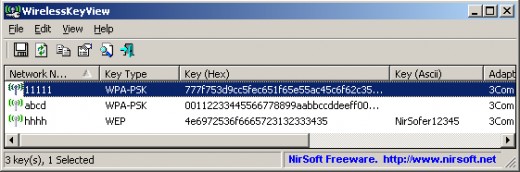
If you have lost your wep key key it can be really hard and frustrating to find out what it is. Most people often change it to a new one but this can become a nuisanse. I am going to teach you how to find your wep key using your registry or a bit of free software. You can also use it to recover you wpa psk key too! No hacking involved. As long as you have used it on before, you can easily reveal what the key is. It is done in three steps with a simple tool:
- Download wireless key view, its free.
- Open program
- Write down WEP/WPA key
Yes, its that simple. If you don't have a copy of WirelessKeyView, go to the website and download it. There's no long install, just load it up and lets get started, If you have problems loading it, just do a simple google search for "wifi key recovery software."
WEP stands for Wired equivalent privacy and is an encryption technology used in many wireless devices (wifi) devices. It is an 802.11 security protocol that deploys rc4 ciphering technology using 64 and 128 bit encryption, It has found to be hackable and has been revised into several versions.
WPA stands for Works progress Administration and was introduced to fix the problem presented in WEP networks. Data is highly secured due to the TKIP or Temporal Key Integrity Protocol. Hackers have proved to break this encryption but the chances are very slim as it would take thousands of years to successfully bruteforce a WPA key.
Well with this piece of software you can recover WEP and WPA keys all day long. It finds out the key by looking into the systems registry for the stored code and presents it to you. If you cant be bothered to download the software, you can find your key stored in this folder of your registry:
HKEY_LOCAL_MACHINE\SOFTWARE\Microsoft\WZCSVC\Parameters\Interfaces\
Good luck and comment if you have any questions.
Video Tutorial
Here's a video that takes you through the process step by step. You don't have to download anything with this method. This is NOT hacking, its simply recovering your key if lost or misplaced.
Comments
You will be able to retrieve your wep key without having to change it. You must be the owner of the access point or have permission from the legal owner.
very cool I shall give it a try, does it only work for WEP or will it work for WAP and higher levels of security?
It only works for WEP. There are different methods of obtaining other kinds of encyption keys. I'll write a hub on a few others and post them soon!
Very helpful, thanks!
Cool Hub. Thanks, Ilearned something new today.
Thanks for the information, and its really a cool and nice hub...
it wont work for me!!!!!!!!!!!!!!!!!
Try this software, it should recover all WEP/WPA keys!
good info.. From other comments it seems like others think they are hacking their own computer.. Its only hacking if you access the registry of OTHERS computers. Hacking your OWN computer is called maintenance ! Thanks 4 sharing the registry file where the key is shown !
iv tied almost every thing i dont want to reset it though thats such a pain in the butt
um, there's like 20 sets of interface numbers. which one do i use?
i hv got a netgear router in which i pressed th rest button. i dunn how to reconfigure the settings. i went to 198.168.1.1 it takes m to the dsl router page for my airtel connction and not the netgear page. 198.168.0.1 doesnt work. pls can somebody help me find my WEP key ??
really useful info that, thanks
DaBang, when you reset your router, connect to it. When you are connect, click start, then run, and then type cmd and press enter. When the command prompt is open, type ipconfig and press enter. You should see a bunch of ip addresses. Look for the ip address that beside "default gateway". Instead of going to 192.168.1.1, go to the gateway address that was shown. You should be able to configure your router from there.
Looked under the wzcsvc\parameters\interfaces etc but nothing said wep key. It had default type:reg-sz, value not set
acitve settingss, control flags and layout version. What am I looking for here?
WPA stands for Wi-Fi Protected Access. Works Progress Administration was created back in the 1930's by FDR.
Oh, and this was very helpful. I recovered my router's WEP key after months of searching! Thanks so much for the help :)
This shows a connected wireless demo. What about a unconnected wireless where the Network Key keeps reverting to the old password and won't remember any new passwords. I can even change name of my Network from NetGear2 to GearNet300 and change password and it still reverts to a locked in old password that I don't remember?
Rick, wireless key view will reveal the pass-key even if you change the name or SSID of your access point. Just look for the original name of the wireless router in the list. If you are still stuck or can't see it, reset your wifi router to factory settings.
I need MORE information1 I'm stuck at home, and really need the key so I can Wi-Fi connect! Is there any way you can just view the WEP key??!! Heeeelp!
queenbe 2 years ago
I have to say I am very intrigued. What will this process give you the ability to do? Your directions seem very clear but before I start this what will I gain from this exercise?